This walkthrough explains how to add multiple take-profit and stop-loss targets to any TradingView strategy using PickMyTrade — even if the strategy itself only supports a single exit. You’ll generate an alert template inside PickMyTrade, customize it for strategy signals, and run it with fixed position size to unlock multi-target automation in live trading.
Want multi-target TP/SL without the manual setup? Start your free trial with PickMyTrade today.
1. Open PickMyTrade → Generate Alert #
Go to the Generate Alert section and choose:
- Indicator
- Select your symbol (example:
MNQ1!) - Alert Type: BUY (this is temporary — you will replace it later)
- Order Type: MARKET
- Quantity: Enter a fixed total quantity, e.g., 5
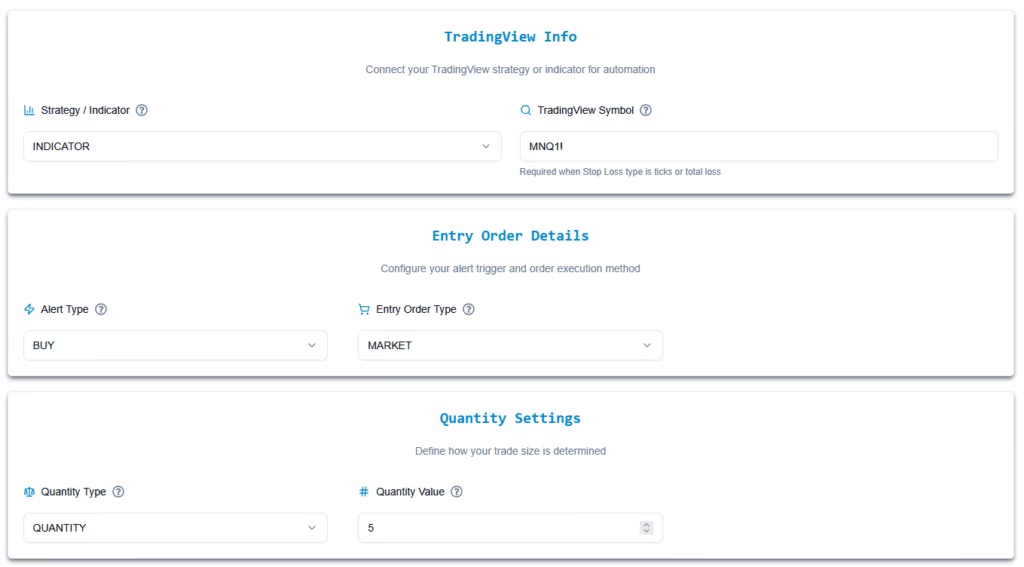
Note: This method does not allow dynamic quantity from strategy. Quantity must be fixed here.
2. Enable Multi-TP / Multi-SL #
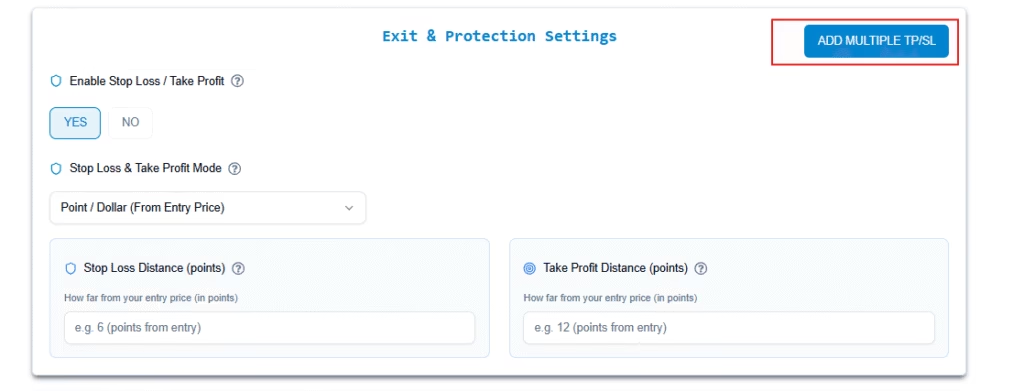
Select “Enable Stop Loss / Take Profit” → Yes
Then enable: Multiple TP/SL
Now configure each exit. Example:
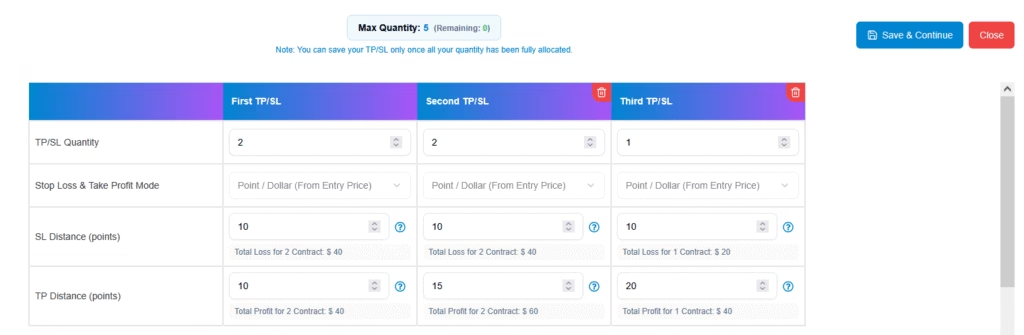
Target 1 #
- Quantity: 2
- Type: Point/Dollar
- SL: 10 points
- TP: 10 points
Target 2 #
- Quantity: 2
- SL: 10 points
- TP: 15 points
Target 3 #
- Quantity: 1
- SL: 10 points
- TP: 20 points
Now you have 5 contracts split across 3 different exits.
3. Add Account #
Click Add Account, choose your account, and confirm.
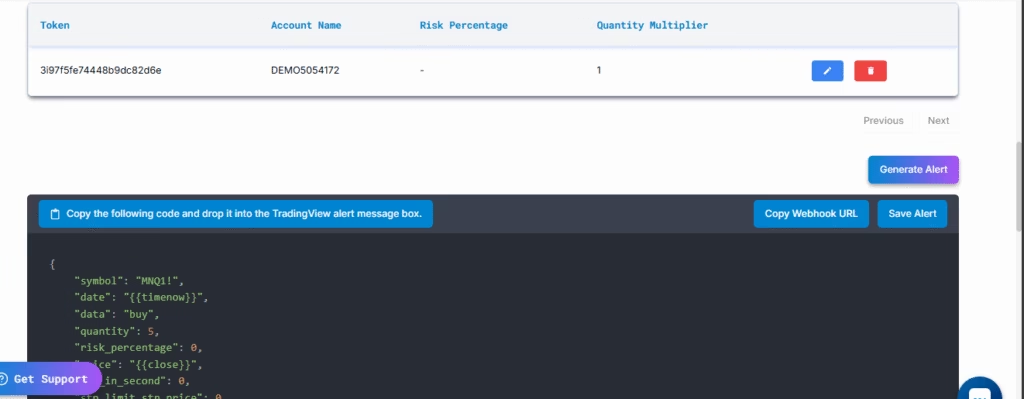
PickMyTrade will generate a code template.
Copy the JSON.
4. Modify the Code for Strategy Alerts #
Paste the generated JSON into a text editor.
You’ll now make ONLY One required changes:
Replace static BUY/SELL with strategy signal #
Find:
"data": "buy"
Replace with:
"data": "{{strategy.order.action}}"
This lets your TradingView strategy send either “buy” or “sell” into PickMyTrade automatically.
By default, TradingView strategy alerts send the trade action using:
{{strategy.order.action}}– buy or sell
This is the default and recommended value used by PickMyTrade to execute trades.
Optional Change #
Users can update the alert JSON to use:
{{strategy.market_position}}– long, short, or flat
This value represents the expected position state after the signal is executed, not the trade action itself.
Important Note #
{{strategy.order.action}}tells PickMyTrade what trade to place{{strategy.market_position}}tells PickMyTrade what the final position should be
For most strategies, no changes are required and the default setup should be used.
5. Final JSON Example #
Showing the modified sample code:
{
	"symbol": "MNQ1!",
	"date": "{{timenow}}",
	"data": "{{strategy.order.action}}",
	"quantity": 5,
	"risk_percentage": 0,
	"price": "{{close}}",
	"stp_limit_stp_price": 0,
	"update_tp": false,
	"update_sl": false,
	"breakeven_offset": 0,
	"token": "PickMyTrade_token",

	"pyramid": false,
	"same_direction_ignore": false,
	"reverse_order_close": true,

	"order_type": "MKT",

	"advance_tp_sl": [
		{
			"quantity": 2,
			"tp": 0,
			"percentage_tp": 0,
			"dollar_tp": 10,
			"sl": 0,
			"percentage_sl": 0,
			"dollar_sl": 10,
			"breakeven": 0,
			"breakeven_offset": 0,
			"trail": 0,
			"trail_stop": 0,
			"trail_trigger": 0,
			"trail_freq": 0
		},
		{
			"quantity": 2,
			"tp": 0,
			"percentage_tp": 0,
			"dollar_tp": 15,
			"sl": 0,
			"percentage_sl": 0,
			"dollar_sl": 10,
			"breakeven": 0,
			"breakeven_offset": 0,
			"trail": 0,
			"trail_stop": 0,
			"trail_trigger": 0,
			"trail_freq": 0
		},
		{
			"quantity": 1,
			"tp": 0,
			"percentage_tp": 0,
			"dollar_tp": 20,
			"sl": 0,
			"percentage_sl": 0,
			"dollar_sl": 10,
			"breakeven": 0,
			"breakeven_offset": 0,
			"trail": 0,
			"trail_stop": 0,
			"trail_trigger": 0,
			"trail_freq": 0
		}
	],

	"multiple_accounts": [
		{
			"token": "pickmytrade_token",
			"account_id": "1_account_id",
			"risk_percentage": 0,
			"quantity_multiplier": 1
		}
	]
}
Do not modify advance_tp_sl or multiple_accounts.
They remain exactly as generated.
Note: PickMyTrade will always use the quantity configured in its alert JSON, not the quantity defined in your Pinescript strategy. The strategy’s quantity is ignored.
6. Add This Modified JSON Into Your TradingView Strategy Alert #
Create a new strategy alert in tradingview and paste the updated JSON into the Message Box along with Webhook URL.
Now your strategy can:
✓ Send BUY/SELL signals
✓ Use multiple TPs & SLs
✓ Execute automatically in PickMyTrade
✓ Maintain fixed total quantity
Important Limitations #
❌ You cannot pull quantity from strategy (strategy.position_size).
Quantity must be hardcoded during alert generation.
❌ If your strategy already has built-in multiple TP/SL logic, do not use this method.
Instead, directly generate alerts from strategy using PickMyTrade’s default multiple-TP option.
FAQ’s #
It’s a method that lets traders use more than one take-profit and stop-loss level for a single position by splitting the total order quantity into separate portions, each with its own exit logic.
After entering your total quantity, go to Risk Settings and enable Multiple TP/SL. This unlocks separate TP/SL blocks where you can assign different quantities and targets.
Yes. Each TP/SL block can use its own stop loss, take profit, breakeven, and trailing stop values, allowing more flexible trade management.
Yes. It’s designed for scaling out gradually—for example, closing part of a position at an early target while letting the rest run to a larger target.
More Resources #
See how this fits into PickMyTrade’s Tradovate automation.
Tradovate automation on pickmytrade.trade
Last updated: September 29, 2026


