The BreakEven Offset feature enhances PickMyTrade’s Tradovate automation by giving traders more control over how stop-loss levels are adjusted once the trade moves in profit.
Earlier, users could only move their stop to breakeven.
Now, with BreakEven Offset, you can move it slightly beyond or below breakeven, securing profits or adding a small cushion to prevent premature exits.
What Is BreakEven Offset? #
BreakEven Offset defines how far beyond the breakeven price your stop-loss should move once the breakeven trigger activates.
Regular BreakEven (No Offset) #
- You enter a trade
- Price moves in your favor
- Your stop loss moves to your entry price
Result:
If price reverses, you exit with $0 profit.
This protects you from losing—but it doesn’t pay you.
BreakEven With Offset #
- You enter a trade
- Price moves in your favor
- Your stop loss moves beyond your entry price
Result:
If price reverses, you still keep some profit.
This turns break-even into guaranteed profit protection.
This offset follows the same measurement type chosen under your Risk Settings, such as:
- Ticks
- Points
- Dollars
- Percentage (Entry Price)
So, if your risk settings are set in points or dollars, the breakeven offset will automatically apply in the same unit type.
Single TP/SL Setup (Standard Format) #
This is the most common setup for traders using one Take Profit and one Stop Loss.
Steps to Set It Up #
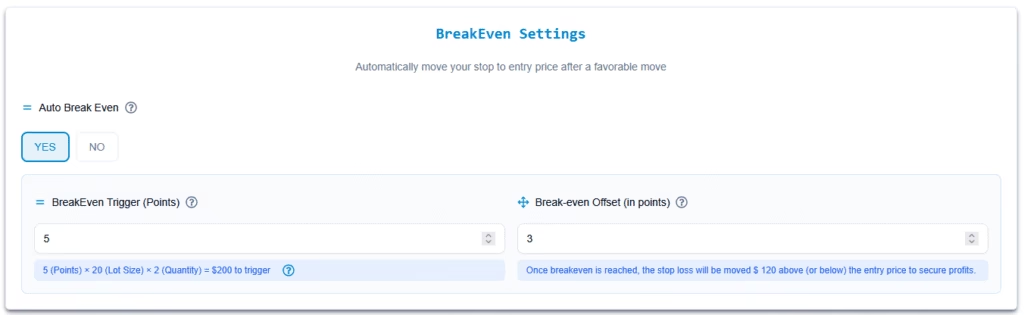
- Go to the Alert Creation Page in PickMyTrade.
- Under BreakEven Settings, choose:
- Do You Want To Place Auto BreakEven? → YES
- Enter Price Movement for BreakEven → e.g.,
5(price must move 5 units — ticks/points/dollars — in your favor) - Break-even Offset → e.g.,
3(stop moves 3 units beyond entry once BE triggers)
- Save and activate your alert.
Example for LONG Order #
- Symbol: ES (E-mini S&P 500 Futures)
- Entry: $5000.00
- Stop Loss: $4990.00
- Take Profit: $5020.00
- BreakEven Trigger: $5
- BreakEven Offset: $3
➡ When price moves from $5000 → $5005, your stop automatically moves to $5003.
You now lock in +$3 profit per contract instead of just reaching breakeven.
Example for SHORT Order #
- Symbol: ES
- Entry: $5000.00
- Stop Loss: $5010.00
- Take Profit: $4980.00
- BreakEven Trigger: $5
- BreakEven Offset: $3
➡ When price drops from $5000 → $4995, your stop automatically moves to $4997.
You secure +$3 profit per contract instead of just breaking even.
Multiple TP/SL Setup (Advanced Format) #
This setup allows you to split your trade into multiple quantities and assign unique BreakEven Offsets to each segment.
Steps to Set It Up #
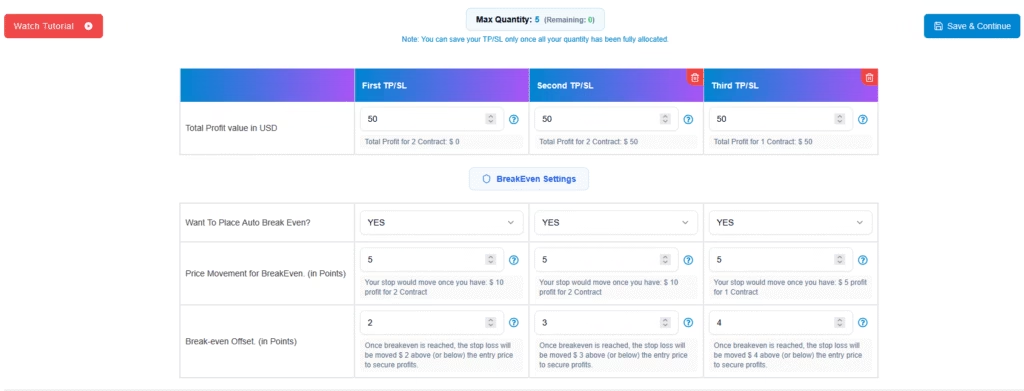
- Open your PickMyTrade alert configuration.
- Choose the Multiple TP/SL format.
- Define your structure as follows:
| Quantity | Take Profit | Stop Loss | BreakEven Offset |
|---|---|---|---|
| 1 | 50 | 35 | 2 |
| 1 | 50 | 25 | 3 |
| 2 | 50 | 35 | 4 |
- Save your alert.
Each portion will independently calculate and adjust its breakeven offset once triggered.
Example for LONG Order #
Symbol: NQ (Nasdaq Futures)
- Entry: $1000
- BreakEven Trigger: $5
- Setup:
| Quantity | TP | SL | BE Offset | Result |
|---|---|---|---|---|
| 1 | $10,010 | $9,995 | $2 | Stop moves to $10,002 |
| 1 | $10,015 | $9,995 | $3 | Stop moves to $10,003 |
| 2 | $10,020 | $9,995 | $4 | Stop moves to $10,004 |
➡ As each segment’s price moves $5 in your favor, that portion’s stop is individually updated to its corresponding offset.
Example for SHORT Order #
Symbol: NQ (Nasdaq Futures)
- Entry: $10,000
- BreakEven Trigger: $5
- Setup:
| Quantity | TP | SL | BE Offset | Result |
|---|---|---|---|---|
| 1 | $9,990 | $10,005 | $2 | Stop moves to $9,998 |
| 1 | $9,985 | $10,005 | $3 | Stop moves to $9,997 |
| 2 | $9,980 | $10,005 | $4 | Stop moves to $9,996 |
➡ Once price moves down by $5 (to $9,995), each stop adjusts above breakeven according to its assigned offset.
Why BreakEven Offset Matters #
Without an offset:
- Winning trades often end at $0
- Good moves don’t get rewarded
With an offset:
- Small profits are locked in automatically
- You still give trades room to continue
- Emotional decision-making is reduced
When to Use Offset #
Conservative (1–2 points) #
Best when you want minimal risk and steady protection.
- Locks in small profit
- Allows trade to continue
- Good for choppy or uncertain markets
Moderate (3–5 points) #
Balanced approach for most traders.
- Protects meaningful profit
- Still gives price room to move
- Ideal for day trading strategies
Aggressive (5+ points) #
Maximum profit protection.
- Locks in gains quickly
- Tighter stop
- Best for volatile markets or high-confidence entries
Best Practices #
- Combine offset with a breakeven trigger, not immediately at entry
- Test different offsets in a demo account
- Increase offset in higher volatility markets
- Avoid offsets that are too tight for the instrument
Quick Summary #
- Regular breakeven = no loss, no gain
- BreakEven offset = guaranteed profit
- Choose offset size based on market conditions and risk tolerance
Key Notes #
- Multi-quantity offsets help manage scaling out strategies effectively.
- The BreakEven Offset adapts automatically to your chosen Risk Type unit (ticks, points, percentage or dollars).
- Not supported when using Price risk type — breakeven and offset will not apply in those modes.
- Offset works on both single and multi-TP/SL formats.
FAQ’s #
BreakEven Offset is a feature that moves your stop-loss beyond the entry price after the breakeven trigger is reached. Instead of exiting at zero profit, it helps secure a small gain if price reverses.
Regular breakeven moves your stop to the exact entry price. BreakEven Offset moves it past entry by a chosen amount, creating profit protection rather than just loss protection.
Yes. In Multiple TP/SL mode, each portion of the position can have its own BreakEven Offset value, allowing more advanced scaling-out strategies.
Smaller offsets may suit choppy markets where tighter protection is preferred. Larger offsets may suit volatile moves where you want to secure more profit after confirmation.
More Resources #
See how this fits into PickMyTrade’s Tradovate automation.
Tradovate automation on pickmytrade.trade
Last updated: September 29, 2026


