Users of PickMyTrade Manual Trade Copier who copy trades from a master account to multiple client accounts — especially on funded prop firm accounts connected via Tradovate — may occasionally notice:
- A “Sync Notice”
- Slight differences in fill times
- Stop-loss (SL) triggering on one account while another trade remains open
This document explains why this occurs, why it is expected behavior in simulated and funded environments, and what actions users should take.
Why This Happens
When trades are copied from a master account to client accounts:
- Orders are sent at nearly the same time.
- They are still processed independently by the exchange simulation.
- Each account maintains its own queue position.
Even if orders are placed simultaneously:
- Fill times may differ by milliseconds or ticks.
- One account may get filled slightly earlier.
- Stop-loss orders may execute at different times.
- One account may close while another remains open briefly.
This is not a copier malfunction — it reflects real-world order matching behavior.
Tradovate Support Confirmation
In Case, Tradovate Client Services confirmed:
- Demo or Funded accounts simulate real market conditions.
- Stop orders across different accounts may fill a tick or two apart.
- Queue priority and market volatility impact execution timing.
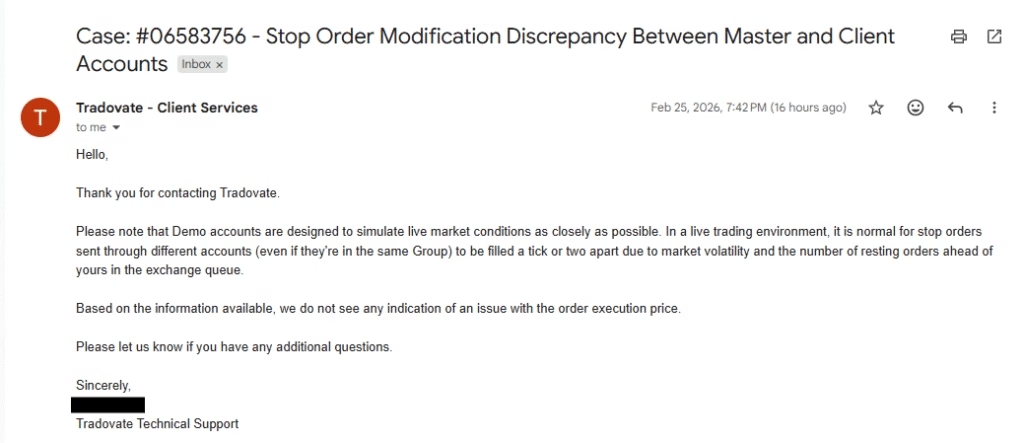
This confirms that the behavior is normal and expected.
Why It’s More Noticeable on Funded Prop Firm Accounts
Most prop firm accounts connected to Tradovate are simulated environments.
Even though they mimic live conditions:
- They are still simulation-based.
- Orders are matched independently per account.
- Execution sequencing can vary.
Because funded accounts are evaluated accounts, traders monitor performance more closely — which makes small timing differences more noticeable.
Common Scenarios Users Report
1. Stop-Loss Hits on One Account First
One client account may:
- Hit stop-loss.
- Close the position.
While another account:
- Remains open briefly.
- Gets stopped moments later.
This happens due to independent fill sequencing.
2. Sync Notice Appears
Tradovate may show a sync notice when:
- Position states temporarily differ.
- One account is flat while another is still open.
- Order modification timing differs slightly.
This does not automatically indicate an error.
3. Partial or Slightly Different Fill Prices
Because each account:
- Has its own simulated queue,
- Has separate order matching,
Minor differences in entry or exit price can occur.
Important Clarification
This behavior:
- Is normal in demo environments.
- Is normal in funded prop firm simulated accounts.
- Is confirmed by Tradovate support.
It is not caused by PickMyTrade when trades are sent simultaneously and correctly.
When This Is Expected vs. When to Investigate
Expected Behavior
- 1–2 tick difference
- Millisecond fill delay
- Temporary sync notice
- SL triggered seconds apart
Investigate Further If
- Large price discrepancies
- Orders missing entirely
- Persistent desync
- Repeated structural mismatches
Best Practices for Users
1. Understand Simulation Behavior
Funded accounts are simulated. Expect slight timing variation.
2. Avoid Micro-Scalp Strategies
Strategies targeting 1–2 ticks are highly sensitive to fill variation.
3. Monitor Network Stability
Ensure stable internet and low latency environment.
4. Allow Minor Variance
Small fill differences are normal and unavoidable.
Conclusion
When copying trades from a master account to client accounts using PickMyTrade on Tradovate:
- Slight fill timing differences are expected.
- Stop-loss orders may trigger at slightly different moments.
- Sync notices may appear temporarily.
- This behavior applies to demo and funded prop firm accounts.
As confirmed by Tradovate support, this reflects realistic market simulation — not a platform or copier error.
Leave a Reply